
Business Practice | How the openUBMC Community Development Pipeline Drives High-Quality Delivery for Yangtze Computing
实践案例
2025/07/26易重辉
Business Practice | How the openUBMC Community Development Pipeline Drives High-Quality Delivery for Yangtze Computing
Introduction
In software development, the build phase is critical because it directly impacts development efficiency and software quality. To support local deployment of openUBMC and improve development efficiency within the enterprise, Yangtze Computing has introduced a developer build solution and a pipeline build solution. The offline deployment–based solutions cover infrastructure configuration and build system design, helping gain a deep understanding of how to construct and optimize the openUBMC build system.
Infrastructure Configuration
(1) Infrastructure and Resource Update Overview
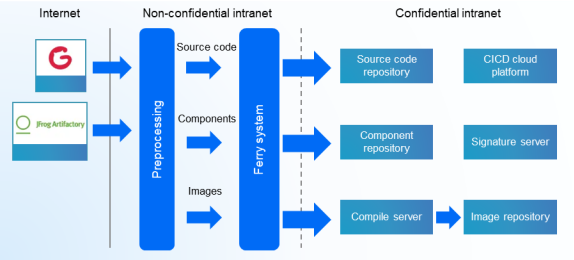
Like many companies, Yangtze Computing conducts most of its development in a pure intranet environment. A key challenge is making community infrastructure compatible with the enterprise's internal systems. To address this, Yangtze Computing has designed a technical solution that deploys openUBMC community resources through unidirectional data flows. Data moves from the Internet to the non-confidential intranet and then to the confidential intranet. This network design ensures both data security and development environment stability.
Due to security requirements, additional deployment procedures have been introduced. To improve efficiency, automation is essential. Therefore, in Yangtze Computing's deployment process, the cross-network transfer of source code and Conan is fully automated via scripting.
(2) Infrastructure Configuration
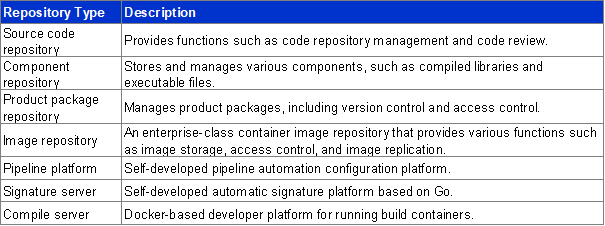
The infrastructure Yangtze Computing sets up for the localized openUBMC deployment is complete, user-friendly, and secure. It provides strong technical support for their commercial release of openUBMC and helps streamline the BMC software development process. It also provides guidance for other enterprise developers building similar development environments and workflows.
3 Developer Build Solution
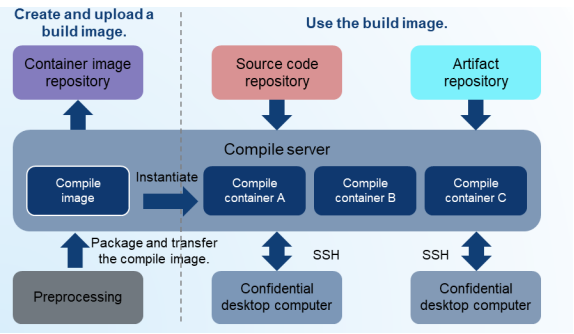
Docker images form the foundation for both manual developer builds and automated pipeline builds. Uploading Docker images to a compile server allows developers to directly build services. Uploading Docker images to a container image repository enables pipelines to build services automatically.
On a compile server, an independent compile container is created for each developer. This design isolates each developer's environment to prevent cross-interference.
Developers can connect to the compile containers through SSH and carry out development. In practice, they can use pre-configured compile containers in a secure desktop environment, allowing them to focus on coding and debugging without worrying about environment setup.
In addition, Yangtze Computing's compile containers support personal data persistence and include a read-only public directory. This design simplifies upgrades to the compilation environment and the transfer of development materials during maintenance.
4 Pipeline Build Solution
(1) Pipeline Requirement Analysis
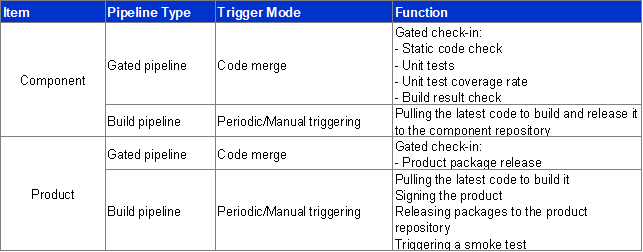
Code gated check-in requirements:
- Component gated check-in pipeline: When component code is merged, the gated check-in pipeline is triggered, performing static code analysis, unit tests, and unit test coverage calculation. Code can be successfully merged only after passing these checks, ensuring high code quality.
- Product gated check-in pipeline: When a product version changes due to component updates, a gated check-in is performed to verify that the product package can be built, ensuring the integrity and availability of the product version.
Version build and release requirements:
- When a component version is released, its binary files must be built and archived to support subsequent use and management.
- When a test version is released, an HPM package must be built and archived. Additionally, a smoke test is triggered to preliminarily verify that the basic product functions are working correctly.
(2) Component Pipeline Design Overview
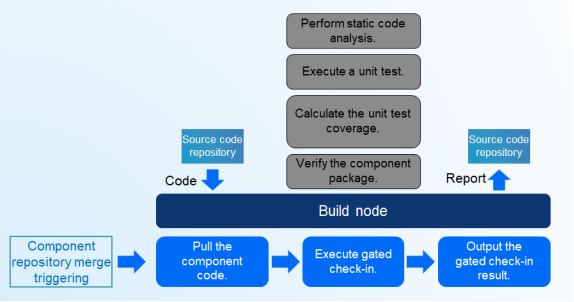
When code is merged into the component repository, the component gated check-in pipeline is triggered. The component code is pulled and subjected to checks, including static code analysis, unit tests, and component package verification. The results are sent to the development team, and the gated check-in outcome determines whether the code can be merged.
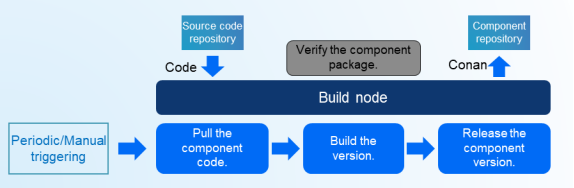
When a component version is ready for release, the component build pipeline is triggered either periodically or manually. The component code is pulled for version building, and the resulting version is released in the Conan repository to enable component updates and sharing.
(3) Product Pipeline Design Overview
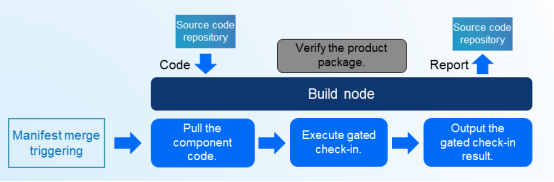
When code is merged into the Manifest repository, the product gated check-in pipeline is triggered. It pulls the component code, verifies whether the code can be merged, and checks the packaging conditions to ensure that a complete package can be generated. Subsequently, a signature request can be triggered to ensure product security.
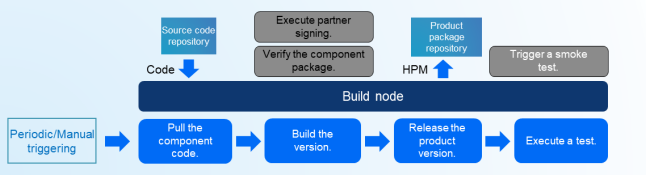
When a product version is released, the product build pipeline is triggered either periodically or manually. It pulls the component code, builds and releases the version, and performs smoke tests to verify product performance and functionality.
(4) Simulation of Pipelines in Software Development
To illustrate the functions and mechanisms of the four pipelines, this blog uses arrows to represent each pipeline type, simulating the build and release processes for three components (A, B, and C) and their associated products. Specifically, the blue downward arrow represents the gated check-in pipeline, the cyan rightward arrow represents the build pipeline, the arrow with black border represents the component pipeline, and the arrow with red border represents the product pipeline.
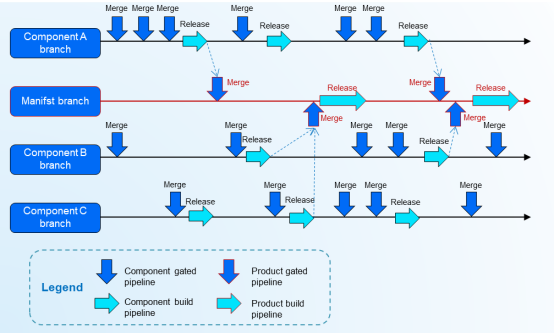
As shown in the preceding figure, the pipeline design closely aligns with the software engineering process.
- Version release after multiple iterations of feature integration: For both components and products, a version is released through a build pipeline after passing several gates.
- Assurance of versions built from the product repository: The product gated check-in pipeline succeeds only after the components have been released through the build pipeline and the changes have been merged into the Manifest repository. If the components are not built, the product gated check-in pipeline will fail and an error is reported indicating the missing components.
- Update of multiple component dependencies: When a requirement involves several component dependencies, their version updates can be incorporated in a single merge request.
- Separation between product and component version releases: After a component version is released through the build pipeline, it does not need to be immediately merged into the product repository. Instead, the version can be released and aligned according to the respective development pace of the component and the product.
The component gated check-in pipeline, product gated check-in pipeline, component build pipeline, and product build pipeline work together to ensure the quality and efficiency of software development. The gated check-in pipelines strictly control code merging, while the build pipelines handle building and releasing versions. Together, they ensure that software development proceeds smoothly in accordance with the defined processes and standards.
5 Scenario-specific Solutions
Deployment scenario: An enterprise builds a Conan repository and plans to migrate Conan binary files from the community repository to its own development environment.
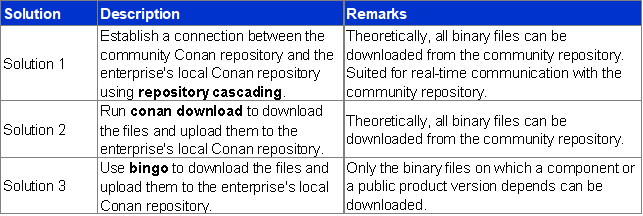
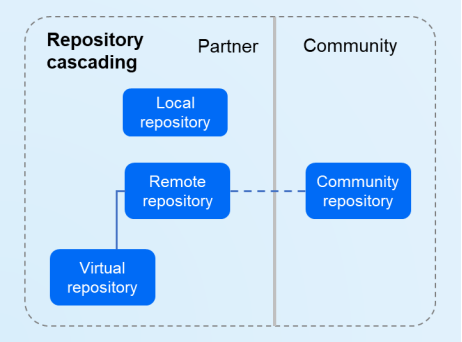
Solution 1: Establish a connection between the community Conan repository and the enterprise's local Conan repository using repository cascading. Theoretically, all binary files can be downloaded from the community repository. This approach works in scenarios where real-time communication with the community repository is possible. While the process is straightforward, it may be impacted by network stability and permission controls.
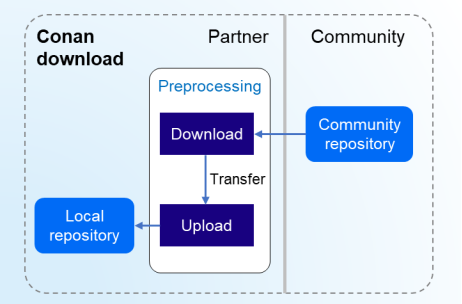
Solution 2: Run Conan download to download the files and upload them to the enterprise's local Conan repository. Theoretically, all binary files can be downloaded from the community repository.
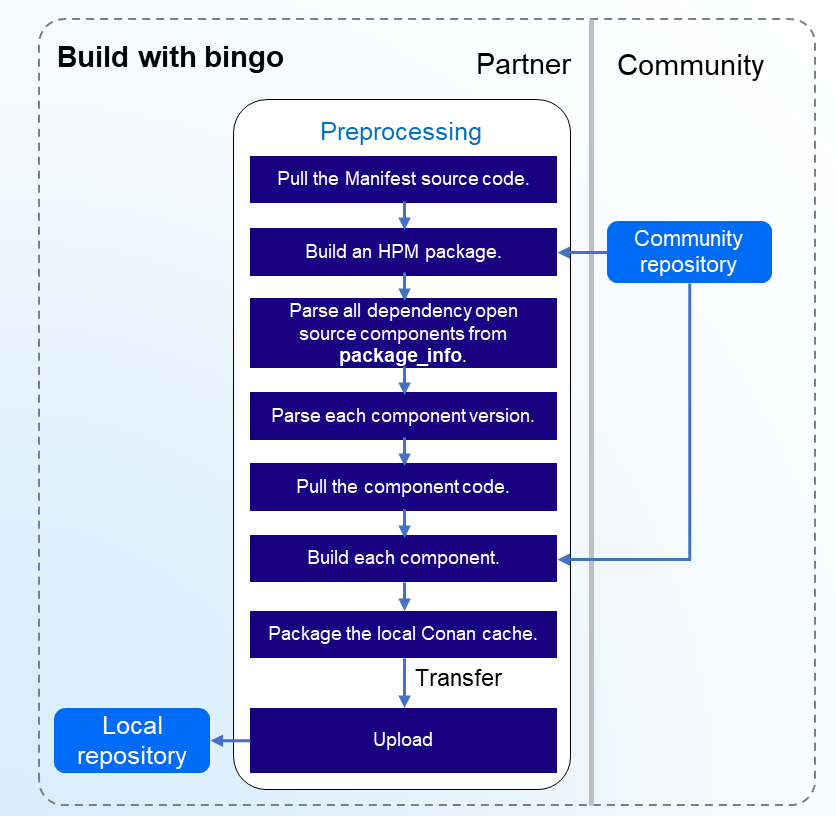
Solution 3: Use bingo to download the files and upload them to the local Conan repository. In this approach, only the binary files required by a specific component or product version can be downloaded, limiting access to all other binaries in the community. However, this approach is practical for handling specific dependencies.
In short, if you have access to the official Conan repository of the openUBMC community, choose Solution 1 for cascading. For offline deployment, opt for Solution 2. If you only need to package the binary files required by a specific component or product, go with Solution 3.
6 Summary
The openUBMC-based developer build and pipeline build practices at Yangtze Computing showcase a comprehensive and systematic build process. Developers within the openUBMC community have drawn significant inspiration from well-structured infrastructure configuration, seamless developer build implementation, a well-designed pipeline build, and efficient approaches to Conan's remote-local deployment. Throughout the development process, developers can leverage this experience and project-specific insights to continually optimize the build system, enhance development efficiency, and maintain high software quality. As a result, developers are better positioned to succeed in the competitive market, speed up software delivery and iteration, and better address user needs and market demands.
【版权声明】Copyright © 2026 openUBMC Community。本文由openUBMC社区首发,欢迎遵照CC-BY-SA 4.0协议规定转载。转载时敬请在正文注明并保留原文链接和作者信息。
【免责声明】本文仅代表作者本人观点,与本网站无关。本网站对文中陈述、观点判断保持中立,不对所包含内容的准确性、可靠性或完整性提供任何明示或暗示的保证。本文仅供读者参考,由此产生的所有法律责任均由读者本人承担。