Introduction
The self-description record (SR) is divided into product self-description record (PSR)and component self-description record (CSR), defined as follows:
PSR defines servers, including their composition and capabilities, from the software perspective. It mainly specifies the hardware structure and configuration validation rules for the entire system.
CSR defines servers from the software perspective and uses software language to describe what they are, how they are composed, and what they can do. It mainly specifies internal component information, their interconnections, and their capabilities.
In openUBMC, the CSR describes hardware information, allowing the system to automatically read relevant data when the hardware is loaded. You are advised to configure the CSR using BMC Studio, which is intuitive and easy to use. For details, see the BMC Studio User Guide.
CSR Structure
Basic Structure
CSR data is in json format. A complete CSR structure consists of FormatVersion, Unit, DataVersion, ManagementTopology, and Objects. Both FormatVersion and DataVersion contain major and minor version numbers. The major version number ranges from 1 to 99 and the minor version number from 0 to 99. If a version number has fewer than two digits, zeros must be added. The version string must be non-null and follow the format "A.BC".
CSR structure example
{
    "FormatVersion": "3.00",
    "DataVersion": "1.00",
    "Unit": {
        "Type": ,
        "Name":
    },
    "ManagementTopology": {},
    "Objects": {}
}FormatVersion- Definition: It defines the CSR data format and overall structure. It is maintained on openUBMC in a unified manner and may be discontinuous.
- Option: mandatory field
- Format:
"Major.Minor", where the major version number ranges from 1 to 99 and the minor version number from 0 to 99. If a version number has fewer than two digits, zeros must be added. - Note: hwdiscovery app will verify and parse FormatVersion values, so it must be configured correctly.
DataVersion- Definition: It changes with the CSR data content. The data version must be updated whenever data is added or modified.
- Option: mandatory field
- Format:
"Major.Minor", where the major version number ranges from 1 to 99 and the minor version number from 0 to 99. If a version number has fewer than two digits, zeros must be added. - Note: hwdiscovery app will verify and parse DataVersion values, so it must be configured correctly.
Unit- Definition: It describes the type and name of the CSR file.
- Type: It indicates CSR's board types, such as extension unit (EXU), basic computing unit (BCU), or I/O expansion unit (IEU).
- Name: It indicates the name of the CSR file, representing the object it describes.
ManagementTopology Structure
As the keyword of the management topology, ManagementTopology is, by default, treated as a reference to the objects under Objects during parsing. Starting from the root node of the tree structure, the connections among buses, chips, and connectors are listed in a level-order traversal.
ManagementTopologycan contain only the hierarchical relationships amongAnchor,Buses,Chips, andConnectors.Anchoris a mandatory object type and must contain theBusesproperty.Buses,Chips, andConnectorsare optional fields and cannot contain other objects.- ManagementTopology describes the logical relationship of links in the CSR file and must be configured according to the designed hardware links.
- The anchor serves as the ingress point of the transmission link of the upstream connector, acting as the bridge between the upper-level connector and the upper-level board.
- The input buses can be mounted with chips and connectors, or left empty. If other objects are mounted to the buses, the chips and connectors configured for the buses must be defined. Note: openUBMC requires that each input bus must contain at least one component (connector or chip), or be passed down to the next-level connector.
ManagementTopology structure
{
    "ManagementTopology": {
        "Anchor": {
            "Buses": [

            ]
        }
    }
}
ManagementTopology example description
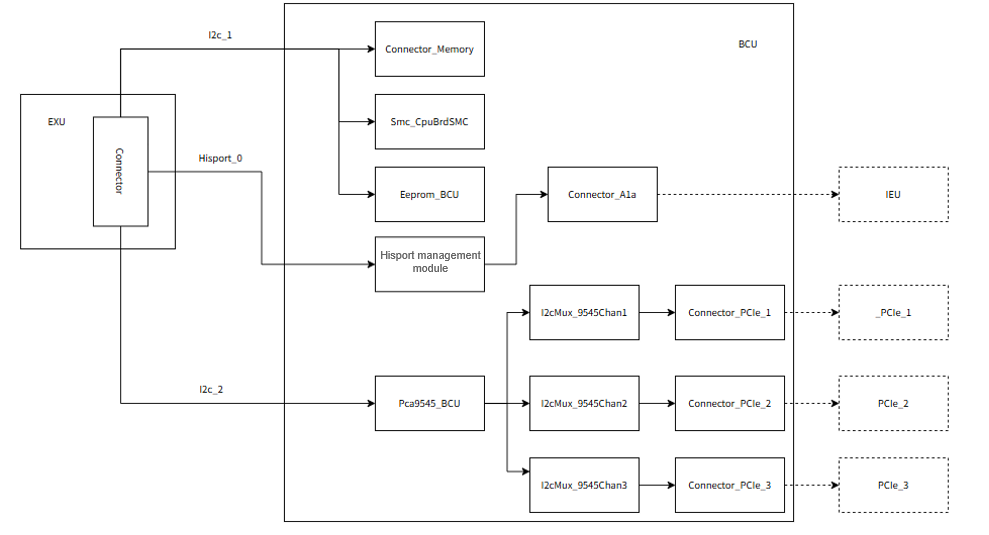
Connector object of the EXU
{
    "Objects":{
        "Connector_BCU": {
            "Buses": [
                "I2c_1",
                "I2c_2",
                "Hisport_0"
            ]
        }
    }
}
Anchor of the BCU
{
    "Anchor": {
        "Buses": [
            "I2c_1",
            "I2c_2",
            "Hisport_0"
        ]
    },
    "I2c_1": {
        "Chips": [
            "Smc_CpuBrdSMC",
            "Eeprom_BCU",
        ],
        "Connectors": [
            "Connector_Memory"
        ]
    },
    "I2C_2": {
        "Chips": [
            "Pca9545_BCU"
        ]
    },
    "Hisport_0": {
        "Connectors": [
            "Connector_A1a"
        ]
    },
    "Pca9545_BCU": {
        "Buses": [
            "I2cMux_9545Chan1",
            "I2cMux_9545Chan2",
            "I2cMux_9545Chan3"
        ]
    },
    "I2cMux_9545Chan1": {
        "Connectors": [
            "Connector_PCIe_1"
        ]
    },
    "I2cMux_9545Chan2": {
        "Connectors": [
            "Connector_PCIe_2"
        ]
    },
    "I2cMux_9545Chan3": {
        "Connectors": [
            "Connector_PCIe_3"
        ]
    }
}
Parsing description: Figure 1 is used as an example to describe the hardware management topology of the BCU.
1. The connector on the EXU is connected to the BCU board at the next level. The buses passed down through EXU's connector will sequentially replace the buses under the topology anchor managed by the BCU. Specifically, the passed-down "I2c_1", "I2c_2", and "Hisport_0" will in order replace the corresponding "I2c_1", "I2c_2", and "Hisport_0" under the anchor, because the buses property defined under the anchor are only symbolic placeholders.

2. Chips ("Smc_CpuBrdSMC" and "Eeprom_BCU") and connectors ("Connector_Memory") are mounted on the "I2c_1" bus.

3. The "I2c_2" bus mounts the chip "Pca9545_BCU", which is a multiplexer capable of supporting up to four buses. The connected buses must be defined under the ManagementTopology, and each bus under "Pca9545_BCU" can further mount multiple chips or connectors.

4. The "Hisport_0" bus mounts the connector "Connector_A1a".
Anchor Structure
Description of the anchor object:
Option: Anchor is a mandatory object type.
An anchor serves as the entry point of the topology structure and must contain the
Busesproperty.The buses property in anchor is symbolic only. It is a string array containing zeros or more elements, used to describe the bus types used in the CSR file. In practice, these buses are sequentially replaced by the buses passed down from the connector at the upper level.
Naming convention: The name is fixed. Only
Anchorcan be used in the CSR file. Variations such asAnchor_1andAnchor_BCUare not allowed.Anchor example description
Connector object of the EXU
json{ "Objects": { "Connector_BCU": { "Buses": [ "I2c_1", "I2c_2" ] } } }Anchor of the BCU
json{ "Anchor": { "Buses": [ "I2c_1", "I2c_2" ] } }Parsing description: Take the anchor of the BCU as an example. Its upper level is the EXU, forming the relationship EXU -> BCU. The two are connected through a connector. The buses passed down through the connector of the upper-level EXU sequentially replace the buses property of the anchor in the BCU.
Buses Structure
Description of the Buses object:
- Option: Buses is an optional object type. If a chip or connector is mounted on a bus, the bus must be defined in the ManagementTopology.
- Bus type: Jtag, JtagOverGpio, JtagOverLocalBus, Gpio, Hisport, I2c, Can, LocalBus, Adc, JtagMux, and I2cMux
- Naming convention: The name format is
"Type_Name", where Type is a valid bus type (see above) and Name is the object name, which cannot be empty. Example: "I2c_2". - Bus source: Buses mounted on ManagementTopology must originate from either the anchor or certain chips, (Pca9544, Pca9545, Pca9548, Smc, JtagSwitch, and I2cMux).
- I2cMux objects must be placed under Pca9544, Pca9545, Pca9548, or Smc.
- JtagMux objects must be placed under JtagSwitch.
- All other bus objects must be placed under anchor.
- Bus configuration: A bus can contain Chips and Connectors fields.
- If the Chips field is configured, it must contain valid chip object names or be left empty.
- If the Connectors field is configured, it must contain valid connector object names or be left empty.
- Buses are described only in the CSR file of the BMC chip/board (the root node of the management topology), that is, the specific content is described in the Objects of root.sr. In non-root CSR files, the Buses in the Anchor serves merely as a symbolic placeholder, and no detailed description is required under Objects.
Note
The same I2cMux or JtagMux bus cannot be mounted under two different chips.
Buses example description
Example of Buses in the root.sr file
json
{ "ManagementTopology": { "Anchor": { "Buses": [ "I2c_1", ] }, "I2c_1": { "Connectors": [ "Connector_EXU_1" ] } }, "Objects": { "I2c_1": { "Id": 1 } } }
2. Example of Buses in the non-root.sr file

	```json
{
    "I2C_2": {
        "Chips": [
            "Pca9545_BCU"
        ]
    },
    "Pca9545_BCU": {
        "Buses": [
            "I2cMux_9545Chan1"
        ]
    }
}
Chip Structure
Option: Chip is an optional object type. If a physical register exists on the board and is mounted on a specific bus, it must be described in ManagementTopology.
Chip types: Chip, Eeprom, Lm75, Pca9545, Smc, Pca9555, Cpld, JtagSwitch, CanbusChip, Pca9544, Vrd, Ads78, and CpldRegister. All these chips represent real physical registers.
Naming convention: The name format is
"Type_Name", where Type is a valid register type (see above), and Name is a non-empty object name. Example: "Smc_CpuBoard".Chip source: A chip object defined in the CSR must be mounted on a bus. It must be declared under ManagementTopology to indicate which bus it is mounted on, and defined under Objects.
Chip configuration example
json{ "ManagementTopology": { "I2c_1": { "Chips": [ "Smc_CpuBrdSMC", ] }, "I2C_2": { "Chips": [ "Pca9545_BCU" ] }, "Pca9545_BCU": { "Buses": [ "I2cMux_9545Chan1", ] }, "I2cMux_9545Chan1": { "Connectors": [ "Connector_PCIe_1" ] } }, "Objects": { "Smc_CpuBrdSMC": {}, "Pca9545_BCU": {}, "Connector_PCIe_1": {} } }Notes:
- The Pca9544, Pca9545, Pca9548, Smc, and JtagSwitch fields can include a Buses field under ManagementTopology.
- The Buses property of Pca9544, Pca9545, Pca9548, and Smc can contain multiple I2cMux buses. The configured bus objects must be defined in Objects.
- The Buses property of JtagSwitch can contain JtagMux buses. The configured bus objects must be defined in Objects.
openUBMC requirements: All chips (except for Pca9544, Pca9545, Pca9548, and JtagSwitch) must configure at least one accessor or scanner or be referenced by other objects. (For details on how to configure the accessor and scanner, see Board and Card Adaptation).
Note
The same chip can appear only once in a given bus topology and cannot exist simultaneously in multiple bus configurations.
Sample description
{
    "ManagementTopology": {
        "Anchor": {
            "Buses": [
                "I2c_1"
            ]
        },
        "I2c_1": {
            "Chips": [
                "Eeprom_BCU"
            ]
        }
    },
    "Objects": {
        "Eeprom_BCU": {},
        "SRUpgrade_1": {
            "StorageChip": "#/Eeprom_BCU"
        }
    }
}| Chip Type | Function | Association with the Bus |
|---|---|---|
| Eeprom | Stores data, such as Tianchi component CSR information, NIC MAC addresses, and FRU information. | It can only be mounted on I2C or Hisport buses. |
| Pca9555 | Converts pin signals into register data that can be read via the bus. The bus is used to read information such as the board's Boardid and Pcbid. | It can only be mounted on I2C or Hisport buses. |
| Pca9545 | A bus expander that expands one signal channel into four channels | It can only be mounted on I2C or Hisport buses. |
| Pca9548 | A bus expander that expands one signal channel into eight channels | It can only be mounted on I2C or Hisport buses. |
| Lm75 | Temperature sensor | It can be mounted on I2C or I2CMux buses. |
| Cpld | Programmable logic array | - |
| Chip_Gpio | - | It can only be mounted on the Gpio bus. |
For details about chip and buses, see the BMC Studio User Guide.
Connectors Structure
- Options: Connectors is an optional object type. If boards are connected through a connector, and the connector is mounted on a specific bus, it must be described in ManagementTopology.
- Connector source: A connector object defined in the CSR must be mounted on a bus. It must be declared under ManagementTopology to indicate which bus it belongs to, and must also be defined in the Objects.
- Naming convention: The name format is
"Type_Name", where Type is fixed asConnector, and Name is a non-empty object name. Example: "Connector_Memory". - Note: Unlike buses and chips, a connector cannot contain further topology configuration under ManagementTopology.
Note
A connector cannot exist in the topology configuration of more than one bus at the same time.
Connector configuration example
{
    "ManagementTopology": {
        "I2c_1": {
            "Connectors": [
                "Connector_Memory"
            ]
        }
    },
    "Objects": {
        "Connector_Memory": {}
    }
}
Objects Structure
Objects structure
{
    "Objects": {
        "class1_1": {
            "Property1": "ABC",
            "Property2": 1,
            "Porperty3": 1,
            "Porperty4": 96
        },
        "class2_1": {
            "Property1": "#/Class1_1",
            "Property2": "Abc${Slot}",
            "Porperty3": 2,
            "Porperty4": null,
            "Property5": "#/Class1_1.Property2"
        },
        "Class3_1": {
            "@Parent": "Class2_1",
            "Property1": "<=/Class2_1.Property4",
            "Property2": 1,
            "Property3": "Xyz${SystemId}",
            "Property4": "BMC${ManagerId}",
            "Property5": "${ChassisId}",
            "Property6": 174,
            "@Default": {
                "Property1": 20,
            }
        }
    }
}
Parsing description: The general structure of objects is used as an example here. For details, see below.
Objects: list all service objects that need to be described within the component or module, such as SMC, Scanner, and NetworkAdapter. These objects are presented in a nearly flat structure, with each object consisting of an object name and a property table.Naming convention: The name format is
ClassName_Name/Index:ClassName: Derived from the data model defined in each component's (App's) MDS and must be globally unique. When the Hardware Self-Discovery component distributes objects, it uses the class name to assign each object to the corresponding component.Name/Index: has no actual meaning and only serves to ensure that each object name is unique within the same CSR file.
Configuration example of the Objects structure
json{ "Objects": { "Smc_CpuBrdSMC": { "Address": 96, "AddrWidth": 1, "OffsetWidth": 1, "WriteTmout": 0, "ReadTmout": 0 } } }Parsing description: When an object is named
Smc_CpuBrdSMC, its class name is Smc and name is CpuBrdSMC. The hwdiscovery app distributes the Smc_CpuBrdSMC to the hwproxy component.The configuration of each object's properties and their values must be aligned with the hardware.
Object definitions can use various Syntax, including variables, synchronization, default values, references, hierarchical structures, and expressions.
When configuring the CSR file, it is not mandatory to specify all Objects properties. If a property is not configured, the hwdiscovery app will first use the default value defined in the corresponding class's model.json file. If no default is defined there, the system will use the type default—for example, if the property type is int, its default value will be 0.
Properties and Property Values of the Objects
When the hardware self-discovery component loads and parses the CSR file, it performs parameter validation on the properties of each object. Therefore, when configuring the CSR file, you must ensure that object properties and their types and value ranges are correct.
All properties (except for @Default and @Parent) configured under the Objects must be defined in the resource collaboration interface properties or private properties of the class that the object belongs to. The usage field must be set to "CSR".
Configuration example of the properties of the Objects
MDS configuration of the PCIeCard
json{ "PCIeCard": { "interfaces": { "bmc.kepler.Systems.PCIeDevices.PCIeCard": { "properties": { "Name": { "usage": ["CSR"] } } } }, "properties": { "Protocol": { "usage": ["CSR"], "baseType": "String" } } } }CSR file of the PCIeCard
json{ "PCIeCard_1": { "Name": "SP670", "Protocol": "SmBus" } }The value type of each property (except for @Default and @Parent) configured under Objects must be consistent with the type of the corresponding property in the resource collaboration interface or the private property defined in MDS. If a property is configured with a reference or synchronization relationship, a trace-back validation is required, and type promotion is allowed.
Configuration example of the property value type of the Objects
MDS configuration of the PCIeCard
json{ "PCIeCard": { "properties": { "PcbID": { "usage": ["CSR"], "baseType": "U8" } } } }MDS configuration of the Accessor
json{ "Accessor": { "interfaces": { "bmc.kepler.Accessor": { "properties": { "Value": { "usage": [ "CSR" ], "baseType": "U64" } } } } } }CSR file of the PCIeCard
json{ "Accessor_PcbID": { "Value": 0 }, "PCIeCard_1": { "PcbID": "#/Accessor_PcbID.Value" } }Parsing description: The PcbID property of the PCIeCard_1 object references the value of the Accessor_PcbID object. Therefore, it is necessary to trace and check whether the value configured in Accessor_PcbID object matches the property value type configured for Accessor in MDS.
The value range of each property (except for @Default and @Parent) configured under Objects must also be consistent with the range defined in the corresponding resource collaboration interface or MDS private property. If the property uses reference or synchronization, a trace-back validation is also required, and type promotion is allowed.
Configuration example of the property value range of the Objects
MDS configuration of the CoolingConfig
json{ "CoolingConfig": { "properties": { "InitLevelInStartup": { "usage": ["CSR", "PoweroffPer"], "baseType": "U8", "minimum": 0, "maximum": 100, "default": 100, "notAllowNull": true } } } }CSR file of the CLU
json{ "CoolingConfig_1": { "InitLevelInStartup": 100 } }Parsing description: The InitLevelInStartup property value of the CoolingConfig_1 object must comply with the value range [0, 100] defined for CoolingConfig.
Syntax
Object definitions can use multiple syntax forms, including synchronous, reference-based, hierarchical, and expression-based syntax.
| Name | Symbol | Description | Category |
|---|---|---|---|
| Static reference syntax | ${} | The value of the referenced object property is loaded once and does not change subsequently. | ${Slot}, ${SystemId}, ${ManagerId}, ${Container}, ${GroupId}, ${ChassisId}, ${GroupPosition}, ${SilkText}, ${FormatVersion}, and ${DataVersion} |
| Dynamic reference syntax | #/ | It actively accesses other objects or their property values. When the referenced object or its property value changes, the referencing object must actively retrieve the updated value. | This syntax involves referencing objects and their properties. |
| Synchronous reference syntax | <=/ | It synchronizes the property values of other objects. When the property values of a synchronized object change, the corresponding property values in the current object are automatically updated. | Only object property synchronization |
| Hierarchical relationship syntax | @ | - | This syntax supports two options—@Parent and @Default. |
| Expression syntax | expr() | This syntax adds mathematical expressions and string processing capabilities to synchronization and reference syntax. | It supports both mathematical expressions and character string processing functions. |
Static Reference Syntax—${}
Position: The static reference exists in the property configuration of a CSR object.
Format:
${ctx}, where${}is a fixed syntax. Character strings can be added before or after${}. Example: "CpuBoard_${Slot}" or "CpuBoard ${Slot} BCU"${}syntax: Only supports character string formats. If the data type of the configured variable matches that of the corresponding property, the system automatically performs type conversion.Types:
- The
${Slot},${SystemId},${ManagerId},${Container},${GroupId},${ChassisId},${GroupPosition}, and${SilkText}can use the property value of the upstream Connector objects as parameters to replace object variables in the CSR of the downstream loading component. - The
${FormatVersion}and${DataVersion}fields are filled using the reserved fields FormatVersion and DataVersion.
Variable syntax configuration example
The root.sr file connects to the Connector object of the EXU module.
json{ "Connector_EXU_1": { "SystemId": 1, "ManagerId": "1", } }Objects of the EXU.sr
json{ "Connector_BCU_1": { "SystemId": "${SystemId}", "ManagerId": "${ManagerId}", }, "DftCD_1": { "Slot": "${GroupId}" }, "PcieAddrInfo_NIC_5": { "GroupPosition": "PcieAddrInfo_NIC_5_${GroupPosition}" } }Parsing description:
- When the EXU.sr file is loaded, the values of "SystemId", "ManagerId", "GroupId", and "GroupPosition" in the "Connector_EXU_1" object of root.sr are transferred once to replace the corresponding placeholders—
${SystemId},${ManagerId},${GroupId}, and${GroupPosition}—in EXU.sr. - In this example, the "SystemId" and "ManagerId" properties of the "Connector_EXU_1" object are configured in root.sr, while "GroupId" and "GroupPosition" are not. Consequently, the default values of "GroupId" and "GroupPosition" in MDS are used.
- The
The value passed through ${} is replaced once and will not change afterward.
Dynamic Reference Syntax—#/
- Type: Dynamic references are divided into object references and property references.
- Position: The dynamic reference exists in a property configuration of the CSR object.
- Format:
#/xxx, where#/is a fixed syntax. If xxx refers to an object defined under Objects, it represents an object reference:#/object_name. If xxx refers to a property of an object defined in Objects, it represents a property reference:#/object_name.property_name. - When configuring an object reference (#/object_name), the object_name cannot be the current object itself. When configuring a property reference (#/object_name.property_name), the object_name can either be another object or the current object.
- Object reference: An object reference allows direct access to properties of all or specified interfaces of the referenced object.
- Property reference: A property reference allows direct access to a specific property within the referenced object.
- Differences between an object reference and a property reference :
- Property references can refer to other properties within the same object, whereas object references can only refer to other objects.
- Property references can be used for certain properties. In certain cases, only object references can be used—for example, Scanner and Accessor objects, which perform read/write operations on objects rather than individual properties.
- When defining the "refInterface" field in the MDS, it must be configured as an object reference.
Object Reference Syntax
Types: Object references are divided into two types: references to objects within the same SR file; references to objects in other SR files (also known as global references)
Referencing objects within the same SR file: The referencing object and the referenced object can belong to the same service component or different components. Syntax keyword: "
#/; format: "#/object_name"Configuration example of referencing objects within the same SR file
json{ "Objects": { "Chip_MCU": {}, "RiserCard_1": { "RefMCUChip": "#/Chip_MCU" } } }Parsing description: The "RefMCUChip" property of the "RiserCard_1" object directly accesses the "Chip_MCU" register within the same SR file and invokes its object interface.
Referencing objects in other SR files (global references): Only root.sr and platform.sr global objects can be referenced. Format: "
#/::object_name".Configuration example of referencing objects in other SR files
root.sr file
json{ "Objects": { "CanbusChip_0": {} } }EXU.sr file
json{ "Objects": { "PsuSlot_5": { "PsuChip": "#/::CanbusChip_0" } } }Parsing description: The "PsuChip" property of the "PsuSlot_5" object in EXU.sr directly accesses the "CanbusChip_0" object in root.sr.
Support for object interface invocation: If a property in a CSR object is defined as a private property in the MDS and includes the refInterface field, that property must be configured as a dynamic object reference in the CSR. The referenced object's class must manage objects of resource collaboration interface associated with the specified refInterface.
Configuration example of support for object interface invocation
Resource management of the private properties of the RiserCard MDS
json{ "RiserCard": { "properties": { "RefMCUChip": { "refInterface":"bmc.kepler.Chip.BlockIO" } } } }Configuration of the private properties in the RiserCard
json{ "RiserCard_1": { "RefMCUChip": "#/Chip_MCU_2e6" } }The bmc.kepler.Chip.BlockIO interface is referenced in this example.
shellNAME TYPE SIGNATURE RESULT/VALUE FLAGS bmc.kepler.Chip.BlockIO interface - - - .BatchWrite method a{ss}a(uay) - - .ComboWriteRead method a{ss}uayuu ay - .PluginRequest method a{ss}ssay ay - .Read method a{ss}uu ay - .Write method a{ss}uay - - .WriteRead method a{ss}ayu - -Service code
lua-- The object parsed by the framework local read_method = obj['RefMCUChip'].readParsing description: The RiserCard_1 directly accesses the "bmc.kepler.Chip.BlockIO" interface properties of the Chip_MCU_2e6 object, enabling direct invocation of this interface in service operations.
If a property references an object, it must be defined in the MDS as a private property with the correct refInterface field. Exceptions:
- Accessor and Scanner referencing Chip objects
- Objects referencing other objects within the same component
Configuration example of the Scanner referencing an object
MDS configuration of the Scanner
{
    "Scanner": {
        "properties": {
            "Chip": {
                "usage": [
                    "CSR"
                ],
                "baseType": "String"
            }
        }
    }
}
Scanner properties in the CSR file
{
    "Scanner_Riser12V0Event": {
        "Chip": "#/Pca9555_IO"
    }
}
Configuration example of an object referencing another object in the same component
MDS configuration of the DftPca9555
{
    "Pca9555": {},
    "DftPca9555": {
        "properties": {
            "RefChip": {
                "baseType": "String",
                "usage": [
                    "CSR"
                ]
            }
        }
    }
}
DftPca9555 property in the CSR file
{
    "DftPca9555_1": {
        "RefChip": "#/Pca9555_IEU"
    }
}
Property Reference Syntax
Types: Property references are divided into two types: references to properties of objects defined in the same SR file; references to properties of objects defined in other SR files (also known as global references).
Property requirements: The referenced property value must be a property implemented by the referenced object's class under the resource collaboration interface managed in MDS. If the referenced object is the same as the current object, the referenced property can also be a private property managed by the class of the current object.
Configuration example of referencing the properties of other objects
MDS configuration of the Accessor
json{ "Accessor": { "interfaces": { "bmc.kepler.Accessor": { "properties": { "Value": {} } } } } }RiserCard referencing Accessor_PcbI value
json{ "Objects": { "Accessor_PcbID": { "Value": 0 }, "RiserCard_1": { "PcbID": "#/Accessor_PcbID.Value" } } }Parsing description: If an object references a property of another object, it may only reference properties that are exposed through the other object's resource collaboration interface.
Configuration example of referencing other properties of the same object
BCU.sr file
json{ "CPU_2": { "Name": "${Slot} |> expr($1 * 2) |> string.format('CPU%s', $1)", "AssetName": "#/CPU_2.Name" } }Parsing description: a property reference can reference other properties within the same object.
Referencing global object properties: It is only supported for global objects defined in root.sr and platform.sr. Format: "
#/::object_name.property_name".Configuration example of referencing global object properties
root.sr file
json{ "Objects":{ "CanbusChip_0": { "Address": 5 } } }EXU.sr file
json{ "Objects": { "PsuSlot_5": { "SlotI2cAddr": "#/::CanbusChip_0.Address" } } }Parsing description: The "SlotI2cAddr" property of the "PsuSlot_5" object in EXU.sr directly references the "Address" property of the "CanbusChip_0" object in root.sr.
Object Property Synchronization Syntax
- Synchronization syntax: Only object properties can be synchronized.
- Property synchronization syntax: supports automatically synchronizing a property value to the corresponding property of the current object during object initialization or when the synchronized object's property value changes.
- Position: Data synchronization exists in the property configuration of the CSR object.
- Format:
<=/object_name.property_name, where<=/is a fixed syntax. object_name refers to an object defined in Objects, and property_name refers to any property under the resource collaboration interface managed by the object's class corresponding to object_name in the MDS. Example: <=/PCIeDevice.Value.
Note
The synchronized object_name cannot be the same as the current object; it must refer to another object. The synchronized property_name cannot be a private property of the object_name—it must be a property defined under the resource collaboration interface.
*Configuration example of synchronizing object properties of the same SR file*

MDS configuration of the Fru
```json
{ "Fru": { "interfaces": { "bmc.kepler.Systems.Fru": { "properties": { "FruId": {} } } } } }
IEU.sr file
```json
{
    "Fru_IEU": {
        "FruId": 1
    },
    "RiserCard_1": {
        "FruID": "<=/Fru_IEU.FruId"
    }
}
Parsing description: When synchronizing the "FruID" property of the "RiserCard_1" object with the FruId property of the Fru_IEU object in IEU.sr, it must be ensured that the FruId property of Fru_IEU object is defined under the resource collaboration interface.
Synchronizing global object properties: Only the global object properties defined in root.sr and platform.sr are supported for synchronization. Format:
<=/::object_name.property_name.Configuration example of synchronizing global object properties
MDS configuration of the FruCtrl
json{ "FruCtrl": { "bmc.kepler.Systems.FruCtrl": { "properties": { "PowerState": {} } } } }platform.sr file
json{ "FruCtrl_1_0": { "PowerState": 0, } }IEU.sr file
json{ "Scanner_Riser3V3Event": { "ScanEnabled": "<=/::FruCtrl_1_0.PowerState" } }Parsing description: The "ScanEnabled" property of the "Scanner_Riser3V3Event" object in the IEU.sr file is synchronized with the PowerState property of the FruCtrl_1_0 object in the platform.sr file.
Default Value Configuration for Object Property Synchronization
- When a synchronized object property is configured with a default value, if the property value of the synchronized object cannot be obtained during object initialization, the system will assign the configured default value. The syntax keyword is
@Default, formatted as"@Default": {}, and multiple synchronized property default values can be set in the same list. (For detailed syntax, refer to Hierarchical Relationship Syntax—@Default.) - According to MDS definitions, the priority of an object's initial property value, from highest to lowest, is as follows: 1. persistent property value of the object; 2. default value defined in the object (only valid for synchronized property scenarios); 3. property value defined in the object; 4. default value defined in the class; 5. default value of the data type.
Configuration example of default value configuration for object property synchronization
- "@Default" configuration for a single synchronized property
json{ "NetworkAdapter_1": { "PCBVersion": "<=/PCIeCard_1.PcbVersion", "@Default": { "PCBVersion": ".A" } } }Parsing description: When the "NetworkAdapter_1" object is initialized, if it fails to obtain the "PCBVersion" property value from its own persisted data and also cannot retrieve the "PcbVersion" value from the synchronized object "PCIeCard_1", the system will use the "PCBVersion" default value defined under the "@Default" configuration in the CSR file.
- "@Default" configuration for multiple synchronized properties
json{ "ThresholdSensor_STBY5V0": { "Reading": "<=/Scanner_ECUSys5V2.Value |> expr($1 / 27.3) |> expr(($1 > 255 || $1 == 0) ? 100 : $1)", "ReadingStatus": "<=/Scanner_ECUSys5V2.Status", "@Default": { "Reading": 100, "ReadingStatus": 2 } } }- When a synchronized object property is configured with a default value, if the property value of the synchronized object cannot be obtained during object initialization, the system will assign the configured default value. The syntax keyword is
Hierarchical Relationship Syntax—@
Types: The hierarchical relationship syntax is divided into @Parent and @Default.
@Parent
- Indicates a parent-child relationship between objects, rather than an inheritance relationship.
- Format:
"@Parent": "object_name" - If a CSR object includes the @Parent property, its value must refer to another object defined in the same CSR file. The corresponding classes of these two objects must also define a parent relationship in the MDS.
- Purpose: Determines under which object the current object is mounted within the resource collaboration interface
Configuration example of the hierarchy relationship syntax
MDS configuration of the NetworkAdapter
{
    "NetworkAdapter":{
        "path": "/bmc/kepler/Systems/:SystemID/NetworkAdapters/:ID"
    },
    "NetworkPort": {
        "parent": "NetworkAdapter",
        "path": ":parent/Ports/:ID"
    }
}
PCIeCard.sr file
{
    "NetworkAdapter_1":{},
    "NetworkPort_0": {
        "@Parent": "NetworkAdapter_1",
    },
    "NetworkAdapter_2":{},
    "NetworkPort_1": {
        "@Parent": "NetworkAdapter_2",
    }
}
Display of resource collaboration interface
/bmc/kepler/Systems/1/NetworkAdapters
│     ├─/bmc/kepler/Systems/1/NetworkAdapters/NetworkAdapter_1_010106
│     │ └─/bmc/kepler/Systems/1/NetworkAdapters/NetworkAdapter_1_010106/Ports
│     │   ├─/bmc/kepler/Systems/1/NetworkAdapters/NetworkAdapter_1_010106/Ports/NetworkPort_0_010106
│     ├─/bmc/kepler/Systems/1/NetworkAdapters/NetworkAdapter_2_010106
│     │ └─/bmc/kepler/Systems/1/NetworkAdapters/NetworkAdapter_2_010106/Ports
│     │   ├─/bmc/kepler/Systems/1/NetworkAdapters/NetworkAdapter_2_010106/Ports/NetworkPort_1_010106
Parsing description: If the PCIeCard.sr file defines a parent relationship between "NetworkPort_0" and "NetworkAdapter_1", their corresponding classes in the MDS must also have a parent relationship. This means "NetworkPort_0" is mounted under "NetworkAdapter_1". Similarly, NetworkPort_1 is mounted under NetworkAdapter_2.
@Default
- @Default defines default values for properties that use synchronization syntax. When the synchronization source does not exist or the initial synchronization fails, the default value will be applied.
- If a property in a CSR object uses synchronization syntax or includes it in an expression, a default value can be configured for this property under the @Default field of the same CSR object. The default value must be of the same data type as defined in the property and fall within the property's defined range. It cannot be configured as a dynamic reference, static reference, or data synchronization syntax. (For specific examples, see Object Property Synchronization Syntax.)
Expression Syntax
Expression syntax: The expression syntax builds upon synchronization syntax (<=/) and reference syntax (#/) to support string processing and mathematical calculations.
Scope: It allows performing expression-based calculations on multiple synchronized object properties or a single referenced object property, assigning the final result to a designated property.
- Multiple synchronized properties are supported because: property synchronization (
<=/) is a weak dependency. This means a property can synchronize values from multiple sources and separates values using semicolons.
Configuration example of multiple synchronized object properties
json{ "Scanner_12v2": { "Status": 0, "Value": 0 }, "Scanner_PowerGood": { "Value": 0 }, "ThresholdSensor_Bcu12v2": { "ReadingStatus": "<=/Scanner_12v2.Status;<=/Scanner_12v2.Value;<=/Scanner_PowerGood.Value |> expr((($1 == 0) && (($2 / 12) > 255 || $2 == 0) && ($3 == 1)) ? 2 : $1)" } }Parsing description:
a. First, synchronize the following properties: Scanner_12v2.Status = 0 → $1 = 0; Scanner_12v2.Value = 0 → $2 = 0; Scanner_PowerGood.Value = 0 → $3 = 0.
b. Define the expression: x = (($1 == 0) && (($2 / 12) > 255 || $2 == 0) && ($3 == 1)). Then perform the ternary operation: x ? 2: 0.
c. Evaluate whether x is true or false: $2 = 0 → (($2 / 12) > 255 || $2 == 0) returns True; $3 = 0 → ($3 == 1) returns False; so (($2 / 12) > 255 || $2 == 0) && ($3 == 1) returns False; $1 = 0 → ($1 == 0) returns True → Therefore, x = False.
d. The resulting "ReadingStatus" value is 0.
- Only a single referenced object property is supported because: property reference (#/) is a strong dependency, not supporting multiple reference sources.
Configuration example of a single referenced object property
json{ "Scanner_3v1": { "Value": 0 }, "Event_CpuBoard3V1_LowerVoltage": { "DescArg1": "#/Scanner_3v1.Value |> expr($1 == 32767 ? 3.3 : (($1 / 20) * 3.3 * 1.5 * 20 / 4096)) |> string.format('%0.3f', $1)" } }Parsing description:
a. The Value property of the Scanner_3v1 object is referenced and passed to $1 in the first pipeline expression($1 == 32767 ? 3.3 : (($1 / 20) * 3.3 * 1.5 * 20 / 4096)), meaning $1 = 0.
b. Perform the expression calculation: Since $1!= 32767, so the right-hand result is used: (($1 / 20) * 3.3 * 1.5 * 20 / 4096). The computed result is 0.
c. The result 0 from the first pipeline is then passed to the second pipeline expression: string.format('%0.3f', $1). Here, $1 = 0, so the output is "0.000".
- Constraint on the number of synchronized object properties: Multiple synchronization sources are allowed only in scenarios involving expression processing. The maximum number of synchronization sources is 10. All sources can only be received by the first expression, and subsequent expressions can only take the output of the previous expression as their input.
- Multiple synchronized properties are supported because: property synchronization (
Structure: An expression consists of parameters and pipelines
(|>).- Parameters: Represented by $1, $2, …, they indicate input values passed from the left side of the pipeline operator or placeholders within expressions. A maximum of 10 parameters is supported.
- Pipelines: The pipeline operator (|>) passes the synchronized or referenced value to the next expression as input. Multiple pipelines can be chained, with each expression's output serving as the input to the next, but the maximum depth is 10.
Types: mathematical calculation and string processing
String processing (
string.*()): Functions such asformat,sub,gsub,upper, andlowerare supported for string manipulation.
string.format (formatting) Configuration example of string.format EXU.sr
json{ "Connector_BCU_1": { "Slot": 1 } }BCU.sr
json{ "CPU_1": { "DeviceLocator": "${Slot} |> expr($1 * 2 - 1) |> string.format('CPU%s', $1)" } }Parsing description:
a. In BCU.sr, the Slot property value passed from the upper-level Connector object Connector_BCU_1 replaces ${Slot}, so ${Slot} = 1.
b. ${Slot} = 1 replaces $1 in the expression on the right side of the first pipeline expr($1 * 2 - 1), after which the expression is evaluated: 1*2-1 = 1.
c. The result 1 is passed to the second pipeline expression string.format('CPU%s', $1), where $1 = 1, resulting in the formatted string "CPU1".
string.upper (converts the string to uppercase)
string.lower (converts the string to lowercase)
string.gsub (replaces substrings, removes spaces, etc.)
string.sub (extracts substrings)
Configuration example of string.sub
json{ "RiserCard_1":{ "MCUVersion": "1.00" }, "Chip_MCU1": { "DrvWriteDelay": "<=/RiserCard_1.MCUVersion |> string.sub($1, 1, 4) |> expr($1 >= '1.12' ? 0 : 1)" } }Parsing description:
a. First, the synchronized property MCUVersion of the RiserCard_1 object, which has the value "1.00", is passed into the first pipeline expression string.sub($1, 1, 4) as $1. The function extracts characters from position 1 to 4 of $1, resulting in the substring "1.00".
b. The result "1.00" from the first expression is then passed into the second pipeline expression expr($1 >= '1.12' ? 0 : 1) as $1. A ternary operation is performed: Since "1.00" < "1.12", the final output is 1. Therefore, the value of "DrvWriteDelay" is 1.